Eyes on the enemy.
Follow a named player, filter friendlies, and inspect the equipment you can observe. Know what is visible before you move.
Track your enemies. Rally your bots. Plan the next Wilderness fight with Swarm Intelligence.
RS-SDK RuneScape private server built on Lost City ↗. Connect your own RS-SDK folder to get started.
Free source on GitCafe. Your machine. Your next move.
Or give the setup prompt to your agent ↓Watch Wilderness hotspots and follow named players. Red marks are your selected opponents, not proof of aggression.
Illustrative PvP scene. Live missions require a configured harness and operator approval.

Find the player. Follow the movement. Put a squad and an exact target into your next command plan.
Track Goondelf and enemy PvP bots—from the zone boundary to the overhead icon.
Keep the zone boundaries, nearby players and movement trails in one view. Follow the visible skull and prayer signals as the fight moves through the Wilderness.
Actual app captures, not live feeds. Skull and prayer tracking uses visible overhead signals; prayer points and unobserved prayers are unknown. “Protect Item” in the death-drop estimate is a what-if assumption, not a confirmed active prayer.
Spot concentrations of players with numbered map clusters, then use the world camera to see the bots behind the numbers.
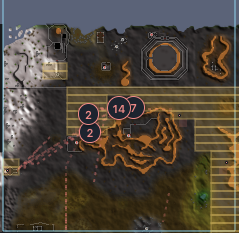
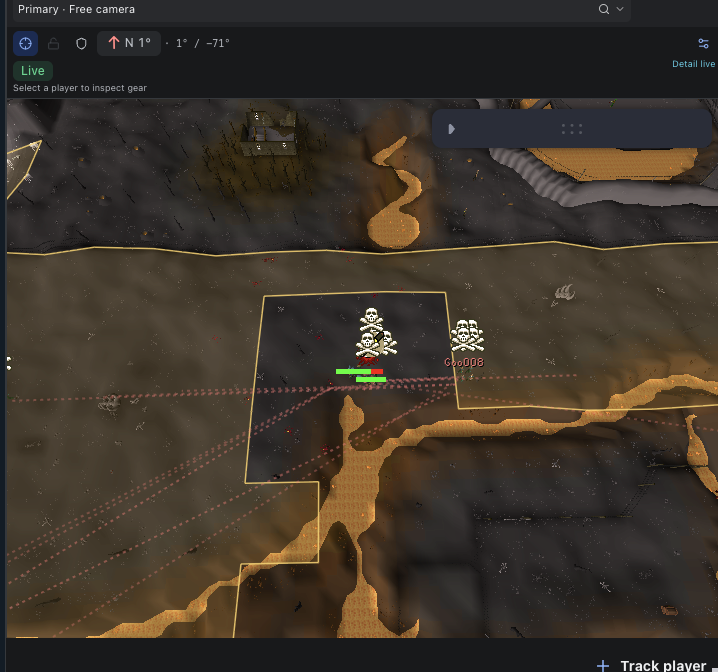
Actual app captures, not live counts. Cluster counts reflect observed players in the current map view and filters; they do not establish team membership or a complete enemy roster.
Choose the view and research layers that help you follow your swarm.
Map controls demonstrated in Ardougne, outside the Wilderness. Actual app capture, not a live feed. Coverage and multi-combat overlays do not indicate safety.
Follow a named player, filter friendlies, and inspect the equipment you can observe. Know what is visible before you move.
Group players into swarms. Set a rally point, assign roles, and prepare follow or engage actions for your enrolled bots.
Build a PvP engagement command, review the exact squad and target, then approve through your configured local harness.
Live execution requires a paired harness, eligible accounts and mission approval. Command integrations are experimental; recordings are not proof of the current release’s execution readiness.
Recorded sessions from the RS-SDK private server.
Looping previews of recorded sessions, not live feeds. Select a preview to play the full recording.
Keep an eye on your farms while you track a Wilderness fight. Put gathering hotspots and PvP targets side by side, with your assistant beside both views.
Actual app capture: Wilderness tracking on the left, Ardougne on the right. Gathering and Hunting showcase the same app—you can combine their cameras. Detailed observations still come from one shared area.
Bring the agent you already use. Give it a project worth playing with.
 Claude
 ChatGPT / Codex
 Grokbot
 Hermes Agent
 OpenClaw
Use an agent with terminal access to install locally. In chat-only mode, ask for a walkthrough. Logos identify agents you can prompt; app integrations vary.
Follow a named player. Keep Wilderness competitors visible. Use friendly filters and swarm groups to understand who is where.
Deep Wild runite · Actual app capture. Detailed NPC coverage follows one shared observation area.
One local service keeps your connected folder, history and agents together. Use a private SSH tunnel to view it from another computer on your network.
Read the cross-device guide ↗Download the open-source dashboard for your own machine, or get started with the underlying RS-SDK project in the cloud.
Currently validated on macOS. You’ll need Git, Node.js, pnpm 10.29.1, Bun, Python 3 and a WebGL2 browser.
git clone https://git.cafe/rs-sdk/palanti-rs-sdk.git
cd palanti-rs-sdk
pnpm install --frozen-lockfile
pnpm run viewer:build
pnpm run check
pnpm run start
Open 127.0.0.1:5197, then connect your RS-SDK folder in Settings. The first viewer build downloads the public game cache.
Open Max Bittker’s RS-SDK project on Hoplite. Start building with an agent without setting up a local development machine.
 Play rs-sdk in 10 seconds in the cloud ↗Open the standard project (no promo) ↗
Sign-in and provisioning time varies. Hoplite pricing and promotion terms apply. This starts RS-SDK; it is not a hosted copy of Swarm Intelligence.
Built on Max Bittker’s RS-SDK, derived from the Lost City private-server project, and the community’s work. Inspect it, fork it, improve it. Bring the coding agent you already use.
Explore on gitcafe ↗
No. Connect your own RS-SDK folder in Settings. The app reads usernames from your bot.env files to build the friendly roster; passwords and tokens stay out of the frontend.
It works with published bank previews, which are partial. Missing items are unknown. Stock goals are planning aids, not transfers or reservations.
Settings includes API, CLI and MCP setup. The assistant uses an installed, signed-in Codex CLI. Additional Mastra and network agent adapters are experimental and require configuration.
This is a source preview. World and market observations depend on upstream feeds. Agent control and gameplay integrations are experimental. Read release readiness before relying on them.
The project source is MIT licensed, with upstream notices preserved. Game assets and third-party components retain their own terms. See the repository’s license and third-party notices.
A squad needs more than a target. Find the stock behind your next fight.
Turn observed holdings into stock goals, then coordinate your configured agents. Your next steel bar is part of a bigger picture.
Explore RS-ECONOMY Intelligence ↗Illustrative items, not account balances. Agent execution requires setup and remains experimental.
A better map. A smarter stock goal. Your weirdest useful agent idea. Swarm Intelligence is open source—help build what comes next.
Contribute ongitcafe  Discord